Follow the instructions below to set the master node.
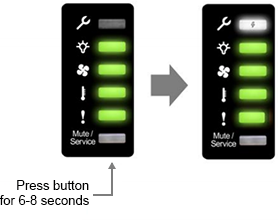
- Choose one node to be set as the master node. Press the Mute/Service button on its front panel for 6- 8 seconds.
- Release the button. The Service LED (i.e. the topmost one) will then blink in white, meaning the master node has been set successfully.
Note:
Only one node can be the master in a cluster system. When more than one node is designated as master nodes, it may cause a deployment failure or abnormal operations in the cluster system.
 首頁