FAQ
How do I manage the management port IP for GS/GSe?
If there is no connection to the DHCP server, EonStor GS default static IP address is 10.10.1.1 or user may go to the Central EonOne Management Software, then add the device(s) using auto search function.
Download/reference link for Central EonOne Management Software
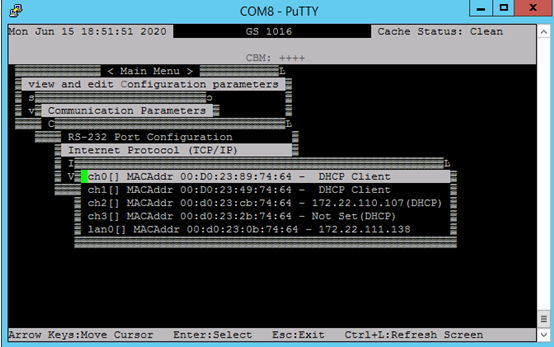
If users have been using DHCP server, they can log in GS/GSe through an RS232 serial console (default password “admin”) to be able to check the current DHCP Management IP address.
To check the Management IP address via RS232 serial console user may go to Main Menu > View and edit configuration parameters > Communication Parameters > Internet Protocol (TCP/IP).
Created Date: 11/30/2021