Symptom:
Need to remove the super capacitor before replacing the memory module, or you received a "Super Capacitor failed" error message indicating that the super capacitor needs to be replaced.
Diagnosis:
The super capacitor may be damaged due to a power trip or because its life limit has been reached.
Solution:
- Remove the controller from the enclosure.
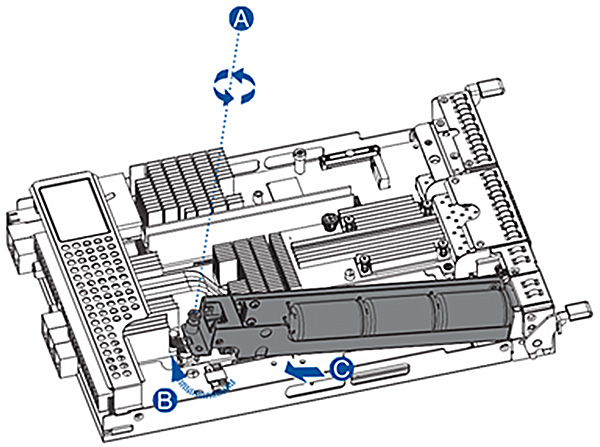
- Remove the super capacitor:
- Loosen the screw securing the super capacitor to the controller (A).
- Lift the super capacitor to a 45° angle (B).
- Pull to remove it from the controller (C).
- Install the replacement super capacitor:
- Attach the replacement super capacitor to the controller.
- Tighten the screw to secure it in place.
- Reinsert the controller into the enclosure.