Часто задаваемые вопросы
Setting up a Serial Terminal with Mac OS X?
Steps to set up a serial terminal:
- Launch spotlight by pressing Command + Space
- Type Terminal
- Select the Terminal app
- In the terminal window, enter command: e.g. ls /dev/cu.usbserial-*

- In the list of connected devices, look for a device that contains cu.usbserial. In the example below, the device name is /dev/cu.usbserial-FT0RVWSW
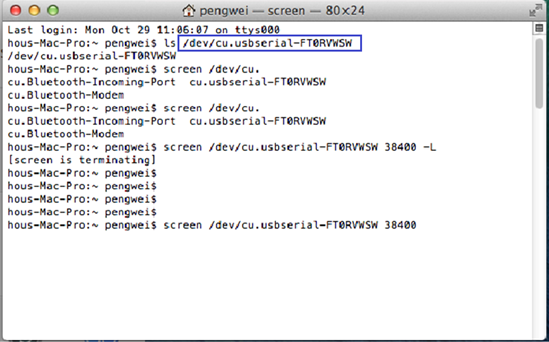
- Connect to the USB serial device using the terminal screen utility by entering the command. e.g. screen /dev/xx.usbserial-xxxxxxxx 115200 –L

- The baud rate of EonNAS is 115200.
- The baud rate of ESDS or ESGS is 38400.
- The baud rate of GS 3000/4000 Gen2 is 115200.
Created Date: 01/16/2019