Symptom:
Cannot access the web GUI on DS model, but can ping the management port IP.
Diagnosis:
The issue might be related to the web GUI service on the DS model.
Solution:
- Restart Web GUI Service:
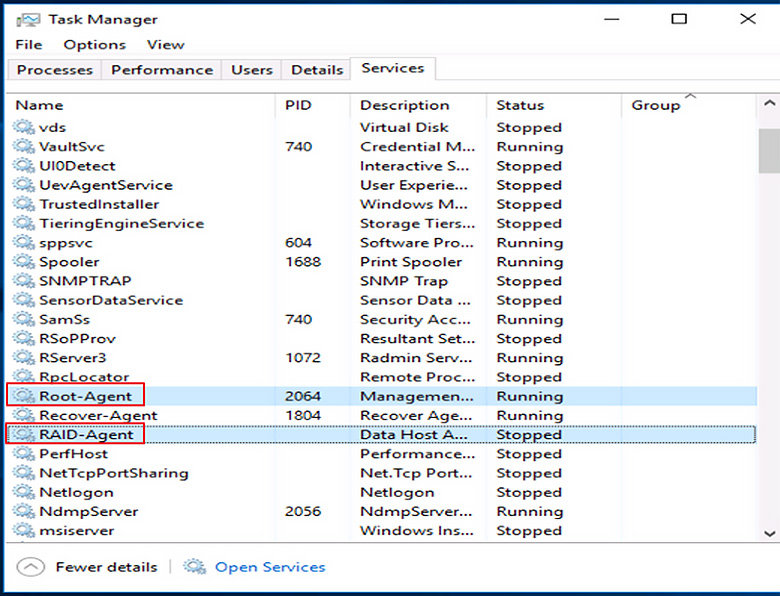
- Open Windows Task Manager.
- Navigate to Service.
- Find and restart the services "RAID Agent" and "Root Agent".
- Check if the web GUI is now accessible.
- Export Diagnostic Logs:
- If the web GUI works after restarting the services, export the diagnostic logs and open a new ticket to share the logs with the Infortrend support team.
- Export Logs:
- Navigate to Web GUI > Settings > Export system information.
- Select your device and click OK. - Open a ticket and share the logs with Infortrend Support.
- Perform a Power Cycle:
- If the web GUI is still not accessible, perform a power cycle as follows:
- Press and hold the service button on the front panel for 5-8 seconds until the white light illuminates.
- Restart the device using the power switch.
- If the web GUI is still not accessible, perform a power cycle as follows:
- After the device has restarted, export the log and dump files for technical support analysis:
- Navigate to Web GUI > Settings > Export system information.
- Select your device and click OK. - Open a ticket and share the logs with Infortrend Support.
By following these steps, you can troubleshoot and resolve issues with accessing the web GUI on a DS model.