Häufig gestellte Fragen (FAQ)
What is the definition of each port in different host board combinations?
You must know the definition of each port in different host board combinations before you start connecting the cables. Refer to the following 7 types of network combinations for details.
Note!
- Do NOT use different types of host boards on the same CS model. Install the same type of host board in both slots (e.g. two 25GbE x 2 or two 40GbE x 2).
- When installing host boards, always install one into the slot on the left side first (with the interface ports facing you).
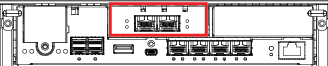
Combination 1: Front-end (Onboard 10GbE x 2) + Internal (Onboard 10GbE x 2)
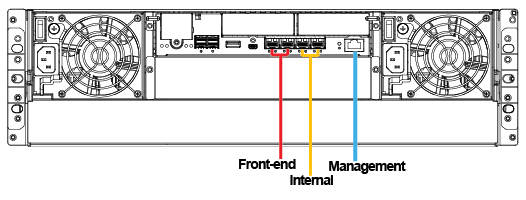
Combination 2: Front-end (Onboard 10GbE x 4) + Internal (Host Board 25GbE x 2)
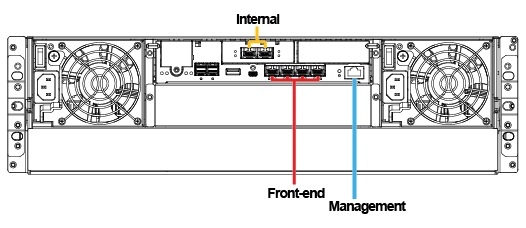
Combination 3: Front-end (Onboard 10GbE x 4) + Internal (Host Board 40GbE x 2)
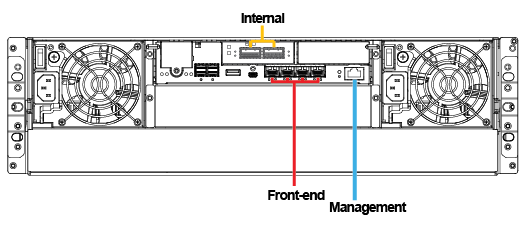
Combination 4: Front-end (Host Board 25GbE x 2) + Internal (Host Board 25GbE x 2)
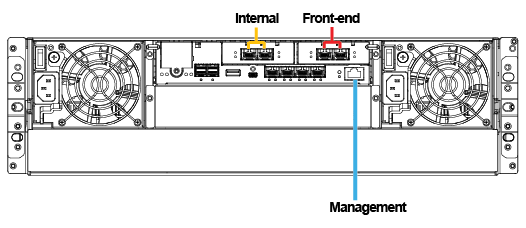
Combination 5: Front-end (Host Board 40GbE x 2) + Internal (Host Board 40GbE x 2)
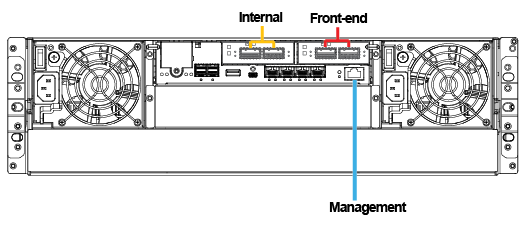
Combination 6: Front-end (Onboard 10GbE x 4 + Host Board 25GbE x 2) + Internal (Host Board 25GbE x 2)
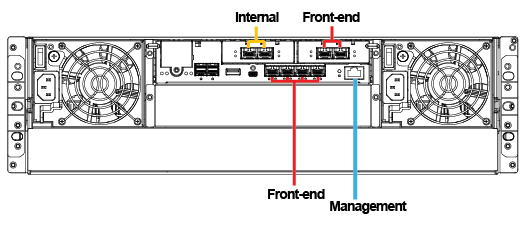
Combination 7: Front-end (Onboard 10GbE x 4 + Host Board 40GbE x 2) + Internal (Host Board 40GbE x 2)
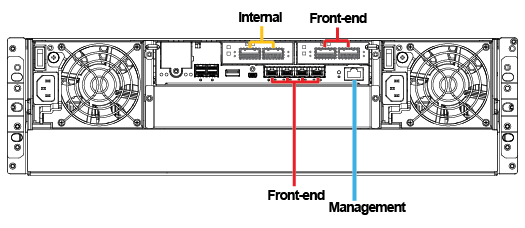
See also:
Created Date: 09/30/2025