Symptom
In the user interface (UI), particularly in the bottom left ‘Summary’ section, the number of volumes displayed is 0, and the volume list appears empty. However, the volumes actually exist and are present in the system, indicating a discrepancy between the UI display and the actual state of the volumes.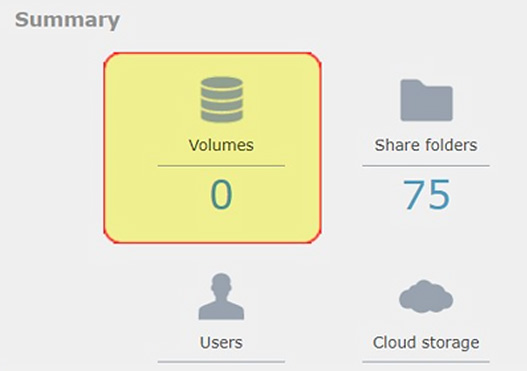
Diagnosis
Upon investigation, we discovered that the system is running a high number of smbd processes. This high number of processes is likely straining the system's resources. In previous cases, we have observed that systems with insufficient memory, such as 8GB, can experience memory exhaustion under similar conditions. This suggests that the combination of too many front-end client SMB connections and inadequate memory can lead to the issue where the UI fails to display the correct volume information.
Based on these observations, hardware limitations, particularly inadequate memory, appear to be a potential cause of this issue.
Detailed Analysis
- System Resource Utilization:
The high number ofsmbdprocesses consumes a significant portion of the system's resources.smbdis the server daemon that provides file sharing and printing services to SMB/CIFS clients. When the number of these processes is excessive, it can lead to increased memory and CPU usage. - Memory Allocation:
Systems with insufficient memory, such as 8GB, may not have enough resources to manage and display the volume information correctly. Insufficient memory can lead to various performance issues, including slow response times and incomplete data rendering in the UI. - UI Display Mechanism:
The UI relies on system resources to fetch and display data. When resources are constrained, the UI may fail to retrieve and show the correct number of volumes, even though the volumes are present in the system.
Solution
To address this issue, we recommend the following steps:
- Increase Memory:
Upgrade the system's memory to at least 16GB or, ideally, 32GB. This additional memory will help ensure that the system can handle the high number ofsmbdprocesses and other resource-intensive tasks. - Optimize Processes:
Consider reviewing and optimizing the number ofsmbdprocesses running on the system. This can involve configuring the system to handle a more manageable number of concurrent connections, which can reduce the load on system resources. - Regular Monitoring:
Implement regular monitoring of system resources to detect and address potential issues before they impact the UI. Tools such as system performance monitors can provide real-time insights into memory and CPU usage, helping to maintain optimal performance.
By increasing the system's memory and optimizing the number of running processes, the UI should be able to accurately display the number of volumes, resolving the issue and improving overall system performance.