FAQ 常見問題
如何透過MAC OSX 設定console連線?
請依照下列步驟進行設定:
1. CMD + Space 打開Spotlight
2. 輸入 Terminal
3. 選擇 Terminal 程式開啟
4. 輸入下面指令如圖示:
例如: ls /dev/cu.usbserial-*

5. 在列出之連線清單中,尋找檔案包含cu.usbserial之裝置。以下圖為例,該裝置名稱為is /dev/cu.usbserial-FT0RVWSW
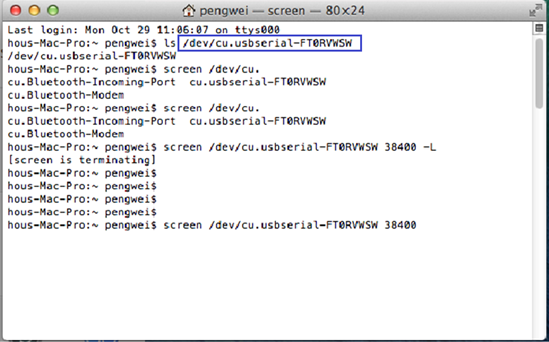
6. 透過下面指令格式連線該裝置,
例如: screen /dev/xx.usbserial-xxxxxxxx 115200 –L

備註:
- EonNAS之baud rate為115200
- DS及GS系列之baud rate為38400
- GS 3000/4000 Gen 2系列之baud rate為115200。
Created Date: 01/16/2019