FAQ
Please refer to the illustrations below. Depending on your host board combination, there are specific ways to connect cables to front-end and internal networks.
“Cross-host board” configurations
From firmware v. 142Z12 onwards, please use a “cross-host board” configuration when there are two host boards installed, as illustrated in Combinations 5(b), 6(b), 7(b), 8(b), 9, and 10 below.
Important!
- To use a cross-host board configuration, you need to re-deploy the cluster if you are upgrading from an earlier version of firmware to v. 142Z12 (or later). If you do NOT plan to re-deploy the cluster after upgrading the firmware, use Combinations 5(a), 6(a), 7(a), and 8(a).
- After you upgrade to v. 142Z12 (or later) AND re-deploy the cluster, you must use a cross-host board configuration (if there are two host boards installed).
- Do NOT use different types of host boards on the same appliance. Install host boards of the same type (e.g. two 25GbE x 2).
- 40GbE host board has been discontinued (EOL) since December 31, 2022.
Combination 1
- Front-end: Onboard 10GbE x 2 (CH0 + CH1)
- Internal: Onboard 10GbE x 2 (CH2 + CH3)
Combination 2
When using only one host board, install it in the left (HB1) slot.
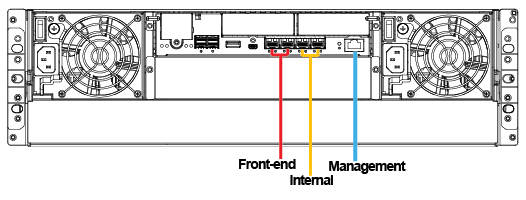
- Front-end: Onboard 10GbE x 4 (CH0 ~ CH3)
- Internal: Host board 25GbE x 2 (CH4 + CH5)
Combination 3
When using only one host board, install it in the left (HB1) slot.
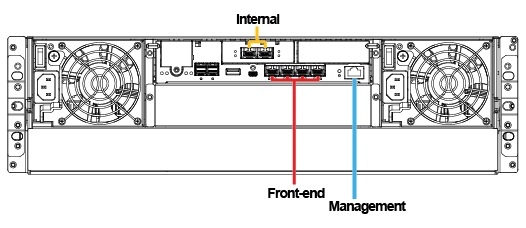
- Front-end: Onboard 10GbE x 4 (CH0 ~ CH3) + host board 25GbE x 2 (CH6 + CH7)
- Internal: Host board 25GbE x 2 (CH4 + CH5)
Combination 4
When using only one host board, install it in the left (HB1) slot.
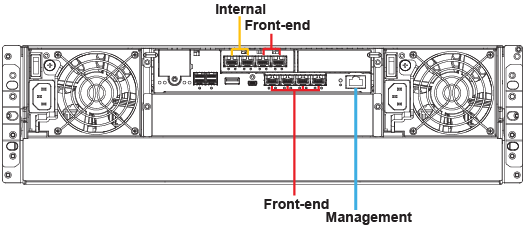
- Front-end: Onboard 10GbE x 4 (CH0 ~ CH3)
- Internal: Host board 40GbE x 2 (CH4 + CH5)
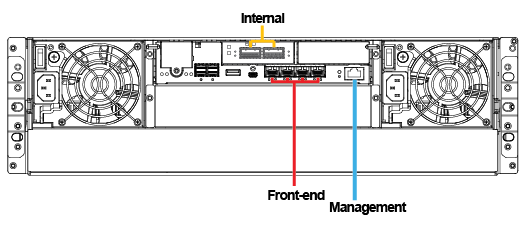
Note:
40GbE host board has been discontinued (EOL) since December 31, 2022.
Combination 5
5(a) Basic
- Front-end: Host board 25GbE x 2 (CH8 + CH9)
- Internal: Host board 25GbE x 2 (CH4 + CH5)
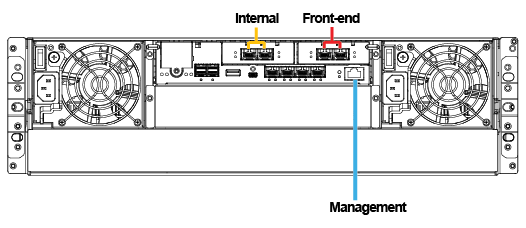
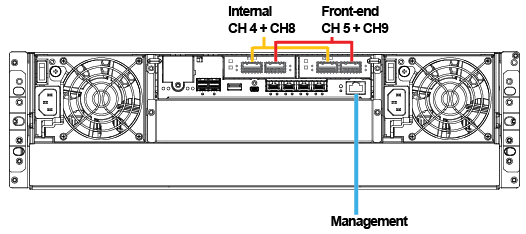
5(b) Cross-host board
This configuration applies to firmware v. 142Z12 and later (re-deployment required).
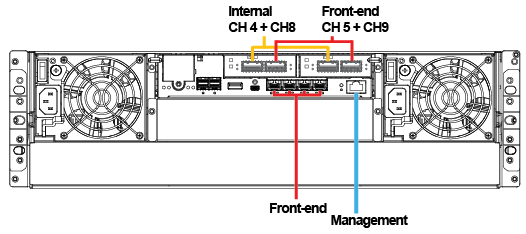
- Front-end: Host board 25GbE x 2 (CH5 + CH9)
- Internal: Host board 25GbE x 2 (CH4 + CH8)
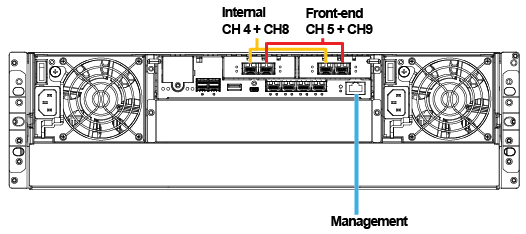
Combination 6
6(a) Basic
- Front-end: Host board 40GbE x 2 (CH8 + CH9)
- Internal: Host board 40GbE x 2 (CH4 + CH5)
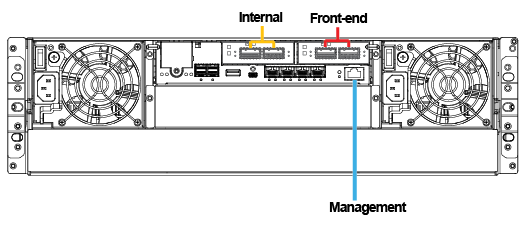
6(b) Cross-host board
This configuration applies to firmware v. 142Z12 and later (re-deployment required).
- Front-end: Host board 40GbE x 2 (CH5 + CH9)
- Internal: Host board 40GbE x 2 (CH4 + CH8)
Note:
40GbE host board has been discontinued (EOL) since December 31, 2022.
Combination 7
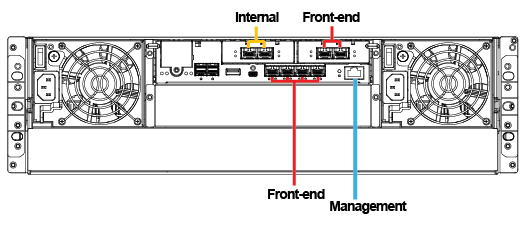
7(a) Basic
- Front-end: Onboard 10GbE x 4 (CH0 ~ CH3)+ host board 25GbE x 2 (CH8 + CH9)
- Internal: Host board 25GbE x 2 (CH4 + CH5)
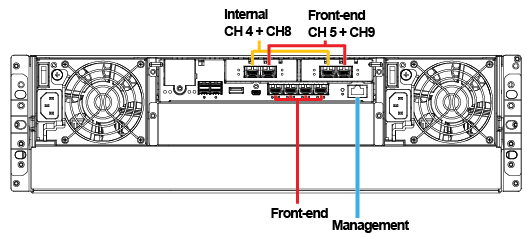
7(b) Cross-host board
This configuration applies to firmware v. 142Z12and later (re-deployment required).
- Front-end: Onboard 10GbE x 4 (CH0 ~ CH3) + host board 25GbE x 2 (CH5 + CH9)
- Internal: Host board 25GbE x 2 (CH4 + CH8)
Combination 8
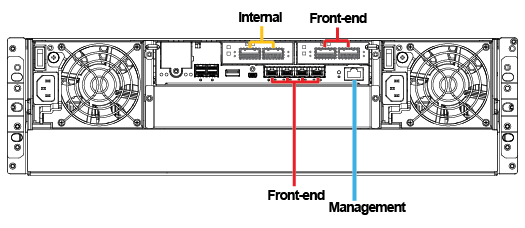
8(a) Basic
- Front-end: Onboard 10GbE x 4 (CH0 ~ CH3)+ host board 40GbE x 2 (CH8 + CH9)
- Internal: Host board 40GbE x 2 (CH4 + CH5)
8(b) Cross-host board
This configuration applies to firmware v. 142Z12 and later (re-deployment required).
- Front-end: Onboard 10GbE x 4 (CH0 ~ CH3) + host board 40GbE x 2 (CH5 + CH9)
- Internal: Host board 40GbE x 2 (CH4 + CH8)
Note:
40GbE host board has been discontinued (EOL) since December 31, 2022.
Combination 9
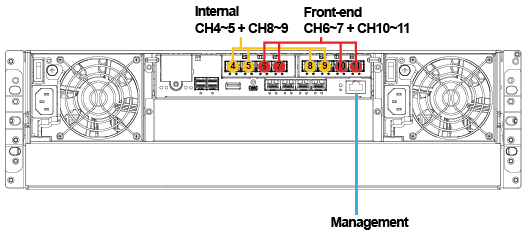
- Front-end: Host board 25GbE x 4 (CH6~7+ CH10~11)
- Internal: Host board 25GbE x 4 (CH4~5+ CH8~9)
Combination 10
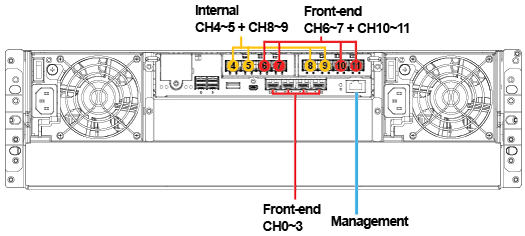
- Front-end: Onboard 10GbE x 4 (CH0~3) + host board 25GbE x 4 (CH6~7 + CH10~11)
- Internal: Host board 25GbE x 4 (CH4~5+ CH8~9)